Library Book Borrowing List
Kategorie : Planer
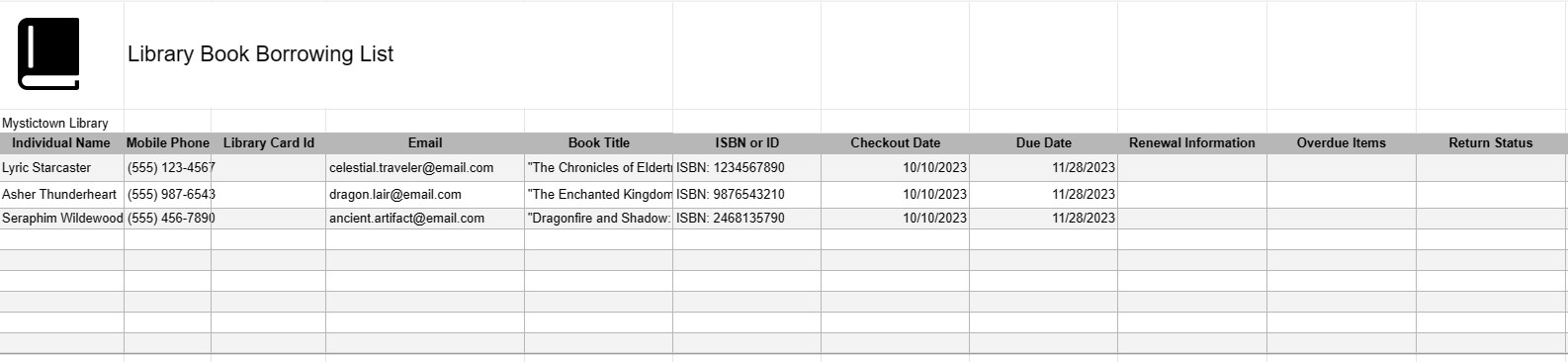
To track the library books the clients are borrowing and to manage the users information.
A Library Book Borrowing List Template is a document used by libraries, librarians, and patrons to manage and keep track of books and materials that are borrowed from a library. It helps ensure the smooth circulation of library materials, avoid late fees, and maintain accurate records of borrowed items.
Key Components of a Library Book Borrowing List Template:
- Library Information: At the top of the template, there may be space for library information, including the library's name, address, contact details, and operating hours.
- Library Card or Patron Information: This section includes the borrower's name, library card number, contact information, and any other relevant identification details.
- Borrowed Items: The main part of the template lists the borrowed items, including the following details for each item:
- Title of the book or material
- Author's name
- ISBN or other identification number
- Due date (the date by which the item must be returned)
- Checkout Date:Records the date when the item was borrowed.
- Due Date: Specifies the date by which the borrower must return the item to the library to avoid late fees.
- Renewal Information: If applicable, a section for recording renewal information, including the new due date, allows patrons to extend the borrowing period for items.
- Overdue Items: This section may list items that are overdue, along with any associated late fees or fines.
- Return Status: Indicates whether the item has been returned to the library or if it is still checked out.
- Comments or Notes: Provides space for additional comments, special instructions, or notes related to specific borrowed items or patrons.
- Signature Area: Includes a space for the borrower's signature and date to acknowledge receipt of the borrowed items.
Benefits of Using a Library Book Borrowing List Template:
- Organization: Helps libraries and patrons keep track of borrowed materials, reducing the risk of lost items.
- Accountability: Encourages borrowers to return items on time and adhere to library policies.
- Efficiency: Streamlines the check-out and check-in process by providing a structured record of borrowed items.
- Communication: Enables librarians to communicate due dates, renewals, and late fees effectively with patrons.
- Record Keeping: Maintains accurate records of borrowed materials for administrative and auditing purposes.
- Customer Service: Enhances the overall experience for library patrons by providing clear and transparent borrowing information.
- Compliance: Helps libraries enforce borrowing policies and regulations consistently.
In conclusion, a Library Book Borrowing List Template is a valuable tool for both libraries and patrons to manage the borrowing and return of library materials efficiently. It ensures that borrowed items are accounted for, encourages timely returns, and contributes to a well-organized library system.
Einfache Vorschau und Download der Tabellenvorlage
Sehen Sie sich die Vollversion einer Tabellenkalkulationsvorlage ohne Einschränkungen an, um zu sehen, ob sie Ihnen gefällt. Anschließend können Sie die Excel-Vorlage herunterladen, sie auf Ihrem Gerät speichern und kostenlos verwenden.
Greifen Sie von überall auf die Tabellenvorlage zu
Dies funktioniert auf allen gängigen Betriebssystemen wie Windows, MacOS, Linux, iOS. Sie können die Tabellenvorlagen ansehen und ohne zusätzliche Programme herunterladen.
So verwenden Sie eine Vorlage
Finden Sie heraus, wie Sie die Tabellenvorlage in der Vorschau anzeigen, herunterladen und dann verwenden können, indem Sie die Schritte befolgen, die äußerst einfach zu befolgen sind
Weitere ähnliche Vorlagen
Sehen Sie sich weitere Tabellenvorlagen an, die zur gleichen Kategorie gehören wie die ausgewählte.